

Modern Robotic Arm Technology Key Advancements for Automation
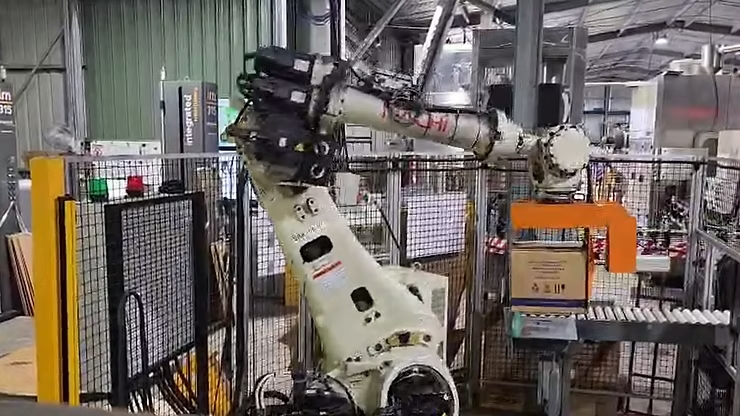
A robot arm used to be a fixed machine behind a safety fence, repeating one motion all day. That picture is changing fast. Modern robotic arms can see parts, feel contact, adjust their path, and be reprogrammed without weeks of specialist work.
This matters because automation no longer belongs only to large factories with long production runs. Smaller manufacturers, research labs, schools, workshops, and logistics teams can now use robotic arms for tasks that once needed custom machinery. The best systems still need careful planning, but they are far more flexible than older industrial robots.
Robot arms are getting more aware of their surroundings
The biggest shift in robot arm technology is awareness. Older robots followed a programmed path with little understanding of what was around them. If a part moved slightly, the robot could miss it. If an object blocked the path, the robot might stop or cause damage.
Modern robot arms use sensors to reduce that gap between programmed motion and real-world conditions. They can detect shape, position, pressure, and resistance. This makes them better suited to production lines where parts vary slightly or where tasks change often.
Vision systems help robot arms see parts
Machine vision gives a robotic arm a way to locate and inspect objects. A camera may sit above a work cell, on the wrist of the arm, or beside a conveyor. The vision software identifies key features, such as edges, holes, labels, colours, or orientation.
This helps with tasks such as:
Picking mixed parts from a tray
Finding items on a moving conveyor
Checking whether a component is present
Reading barcodes or simple markings
Aligning parts before assembly
Inspecting surface defects that are visible to a camera
Vision does not make every job simple. Lighting, shadows, reflective surfaces, and part overlap can still create problems. A shiny metal bracket, for example, may need controlled lighting and careful camera placement. Even so, better cameras and easier vision tools have made robot arms far more useful outside perfectly arranged production cells.
A well-set-up vision system lets the robot work with variation instead of depending on exact positioning every time.
Force sensing makes contact safer and more precise
Force sensing lets a robot arm measure how much pressure it applies. This is useful when the task involves contact, fitting, polishing, sanding, testing, or working near people.
A force sensor may sit in the robot wrist, in the joints, or in the end effector. The controller reads the force data and changes movement as needed. If the robot feels too much resistance, it can stop, slow down, or adjust its position.
Common uses include:
Inserting pins, plugs, or connectors
Applying consistent pressure during sanding or polishing
Placing fragile items without crushing them
Checking whether a part is seated correctly
Handling tasks where tolerances vary slightly
Force sensing is one reason modern collaborative robots, often called cobots, have become popular. These robots are designed with features that help reduce risk in shared workspaces. They still need a proper risk assessment, guarding where required, and safe tooling. The arm is only one part of the safety system.
End effectors now decide what the arm can really do
The robot arm itself gets most of the attention, but the end effector often determines whether the system works. The end effector is the tool at the wrist of the robot. It might be a gripper, suction cup, welder, screwdriver, dispenser, camera, or sanding tool.
A powerful arm with the wrong gripper will struggle. A smaller arm with the right tool can perform well.
Grippers are more specialised than before
Standard two-finger grippers still suit many tasks. They are simple, reliable, and easy to program. Newer grippers add more options:
Adaptive grippers
These can wrap around objects with different shapes. They suit mixed items or parts with slight variation.
Vacuum grippers
These work well for flat surfaces, packaging, sheets, and many lightweight goods.
Soft grippers
These help handle delicate items, such as food, lab samples, or fragile plastic parts.
Magnetic grippers
These can pick ferrous metal parts, even when gripping surfaces are small or awkward.
Tool changers
These let one robot swap tools during a process, such as picking a part, applying adhesive, then using a screwdriver.
The end effector should match the part, not just the payload number on a spec sheet. Shape, surface texture, centre of gravity, and speed all matter.
Smart tools reduce setup work
Some modern tools include built-in sensors and simple software. A gripper might report whether it successfully picked an item. A screwdriver might measure torque. A dispenser might track flow. This feedback helps the robot confirm each step rather than blindly moving through a sequence.
That kind of feedback is valuable for industrial applications where quality and repeatability matter. It also helps operators find faults faster. If a part is not picked, the system can pause or retry instead of failing later in the process.
Programming has become easier, but not automatic
Programming once required specialist robotics knowledge and long code-based workflows. Many industrial robots still use vendor-specific languages, and skilled robot programmers remain valuable. The change is that more tasks can now be taught through guided setup, visual tools, and reusable templates.
Hand guiding makes setup more direct
Many collaborative robot arms allow hand guiding. An operator moves the arm by hand to key positions, then saves those points. The system can turn those positions into a repeatable motion program.
This works well for tasks such as:
Machine tending
Simple pick and place
Inspecting several points on a part
Palletising boxes
Loading fixtures or trays
Hand guiding does not remove the need for accuracy checks. The user still needs to set speeds, approach angles, gripping actions, safety limits, and error handling. Yet it cuts the blank-page problem. Instead of writing every movement from scratch, users can teach the arm the rough path and refine it.
Visual programming lowers the barrier
Many newer systems use block-based or flow-based programming. Users can drag steps into a sequence, such as move, grip, wait, inspect, release, or return home. This makes program logic easier to understand.
For simple jobs, visual programming can be enough. For more complex cells, teams may still need scripting, PLC integration, or custom software. The benefit is that operators and technicians can understand more of the system, which helps with changeovers and troubleshooting.
Simulation helps test before hardware moves
Robot simulation software lets teams build a virtual work cell before installing equipment. They can check reach, clearance, cycle time, and rough tool paths. This reduces surprises once the robot is on site.
Simulation is especially helpful when the robot must work around fixtures, conveyors, guarding, or other machines. It also supports training, since staff can learn movements and workflows without stopping production.
Connectivity makes robot arms part of the wider production system
A robotic arm rarely works alone. It may need to talk to a conveyor, CNC machine, camera, barcode reader, safety scanner, or warehouse system. Better connectivity has made this easier.
Industrial communication standards vary by brand and application, but modern robots often support common links to PLCs, sensors, and factory software. This lets the robot receive instructions, report status, and share basic production data.
For example, a robot tending a CNC machine might:
Wait for the machine door to open.
Remove the finished part.
Blow off chips or place the part in a gauge.
Load the next blank.
Signal the machine to start.
Record that the cycle was completed.
The value comes from the full workflow, not just from the robot moving between points. A good robotic system handles normal operation, small faults, and safe recovery after a stop.

Modern robotic arms support more industrial applications
The practical use cases for robot arms keep expanding. The most successful applications usually share three traits. The task is repeatable, the parts are presented in a manageable way, and the business has a clear reason to automate.
Machine tending
Machine tending is one of the strongest use cases. A robot loads and unloads CNC machines, presses, moulding machines, or test rigs. It can reduce idle machine time and help keep production running during breaks or low-staff periods.
The key details are part presentation, door access, coolant or debris, and safe interaction with the machine. Force sensing and vision can help, but good fixtures and clear process design still matter.
Pick and place
Pick and place remains common because it is easy to understand and often practical. The robot moves parts from one location to another. It may sort, orient, pack, or feed parts into another process.
The challenge is variation. If every part arrives in the same position, the job is simple. If parts arrive mixed in a bin, the system may need 3D vision, special grippers, or a feeder.
Assembly and fastening
Robotic arms can place parts, press components together, insert screws, or apply clips. Force sensing improves these tasks because assembly often involves small position errors and contact.
Fastening requires attention to torque control, bit wear, screw feeding, and alignment. A robot can repeat the motion, but the surrounding tooling must support the full process.
Finishing and surface work
Sanding, deburring, polishing, and dispensing are strong candidates for robot arms. These tasks can be tiring and inconsistent when done by hand. A robot can maintain speed and path consistency.
Force control becomes especially useful here. Too little pressure may leave defects. Too much pressure may damage the part or wear the tool quickly.
Inspection and testing
With cameras, probes, or gauges, a robotic arm can move inspection tools around a part. This can suit larger objects or items with many inspection points.
The robot does not need to be the measuring device. Its job is to position the sensor repeatably. The measurement tool then produces the result.
How to choose the right robotic arm kit
A robotic arm kit can mean many things. It might be an educational desktop arm, a hobby kit, a research platform, a collaborative robot starter package, or an industrial system with gripper, controller, and software. The right choice depends on the work, budget, risk, and support needs.
Start with the task rather than the robot.
Define the job in plain terms
Write down what the arm must do. Include the part, weight, shape, cycle time, reach, accuracy, and environment.
Useful questions include:
What does the robot need to pick, move, press, inspect, or process?
How heavy is the part, including the gripper and any tool?
How far must the arm reach?
How precise does the motion need to be?
Does the part arrive in a known position?
Will the robot work near people?
What happens if the robot drops a part or misses a step?
How often will the task change?
A small desktop robotic arm kit may suit learning, coding, and demonstrations. It will not suit heavy production. A collaborative robot kit may be a strong choice for flexible light-duty automation. A traditional industrial robot may be better for high speed, heavier payloads, harsh environments, or long production runs.
Check the core specifications
The main specifications are easy to compare, but they need context.
Specification | What to check | Why it matters |
Payload | Part weight plus tool weight | Overloading reduces performance and can damage equipment |
Reach | Distance from base to work area | The arm must reach all positions without awkward poses |
Repeatability | Ability to return to the same point | Important for assembly, machining, and inspection |
Degrees of freedom | Number of moving axes | More axes allow more flexible motion around obstacles |
Speed | Motion and cycle capability | Higher speed can improve output, but may affect safety needs |
Controller and software | Programming method and integration options | Affects setup, training, and future changes |
Safety features | Rated stop functions, sensing, limits, and guarding needs | Safety must be designed for the full cell, not just the robot |
Do not choose only by payload. A robot with enough payload may still lack reach, accuracy, speed, or software support for the task.
Match the kit to the skill level
For education and prototyping, look for clear documentation, sample projects, spare parts, and an active user community. Open programming support can be useful for students and developers.
For industrial use, support matters more than novelty. Check local service options, training, warranty terms, safety documentation, and compatibility with standard sensors and tooling. In Australia, also think about electrical compliance, machine safety standards, and the availability of integrators who can support the system over time.
Plan for the hidden parts of automation
The robot arm is only part of the project. Many costs and delays come from the surrounding cell.
Plan for:
Fixtures and part trays
End effectors and tool changers
Cameras, lighting, and mounts
Safety guarding, scanners, or interlocks
Cables, air lines, and power supplies
PLC or machine integration
Operator training
Maintenance access
Spare parts and backup procedures
A realistic plan avoids the common trap of buying an arm first and solving the real application later.
What to expect next from robot arm technology
Robot arms will keep becoming easier to deploy, but the core engineering will not disappear. Better vision, lower-cost sensors, and improved programming tools will help more teams automate practical tasks. Artificial intelligence may also help with object recognition, path planning, and error recovery, especially in messy environments.
Still, successful automation will depend on good process design. A robot arm works best when parts are presented well, tools are chosen carefully, and safety is built into the whole cell.
The best next step is simple: define the task before choosing the arm. Once the job is clear, the right mix of reach, payload, sensing, programming, and end effectors becomes much easier to see. Modern robot arms are no longer only fixed machines for high-volume factories. Used well, they are flexible tools that can make automation more practical, precise, and accessible.

Comments